Coolify vs Dokploy vs Arcane vs Openship: The Self-Hosted PaaS Comparison
Real dashboard screenshots, honest pros and cons, and the exact licensing fine print for Coolify, Dokploy, Arcane, Dokku, and Openship — the open-source platforms that replace Heroku, Vercel, and Netlify on your own server.

Heroku, Vercel, and Render are convenient until the invoice shows up. A handful of small apps, a couple of databases, and a preview environment or two can easily land you at $100–300 a month. A self-hosted PaaS gets you back the same "push to deploy, get HTTPS, see logs in a dashboard" experience, running on a $5–20/month VPS you control.
The problem is that the five tools people actually recommend for this — Coolify, Dokploy, Arcane, Dokku, and the newer Openship — are not interchangeable. They differ in what is genuinely free, how they build your app, whether they run on a single box or a cluster, and how long they have actually been in production on other people's servers. One of them (Arcane) isn't even trying to be the same kind of tool as the other four — more on that below. This post goes through each one with real screenshots of the dashboards, the pros and cons that matter in practice, and the licensing fine print — because "open source" doesn't always mean "everything is free."
If you haven't set up the basics yet (reverse proxy, HTTPS, backups), read the Docker Compose starter stack post first — all five tools below are really just opinionated automation on top of that same foundation.
What actually matters when comparing these
Four of these five tools wrap the same core idea — Git push or Docker image in, container running behind a reverse proxy with HTTPS out. The fifth, Arcane, is a Docker/Compose manager rather than a build-and-deploy PaaS, and it's included because it's a genuinely good, fully-free option if that's actually what you need. Either way, these details change what it's actually like to run day to day:
- What's really free. Several of these projects gate multi-server support, SSO, or audit logs behind a paid license. "Open source" and "free to self-host without limits" are not always the same claim.
- Resource footprint. Some run comfortably on a $5 VPS; others want 2 GB of RAM before you've deployed anything.
- How it builds your app. Nixpacks-style auto-detection, Heroku-style buildpacks, your own Dockerfile, or a raw
docker-compose.yml— this determines how much you need to know about your own stack. - Does it need an agent on the target server? Most of these install a daemon on every server they manage. One of them (Openship) deliberately doesn't.
- Multi-server story. Adding a second server for isolation is very different from clustering — know which one you're actually getting.
- Maturity. GitHub stars are a popularity signal, not a quality one. Age, open-issue count, and commit cadence tell you more about how many rough edges have already been found by someone else.
Coolify
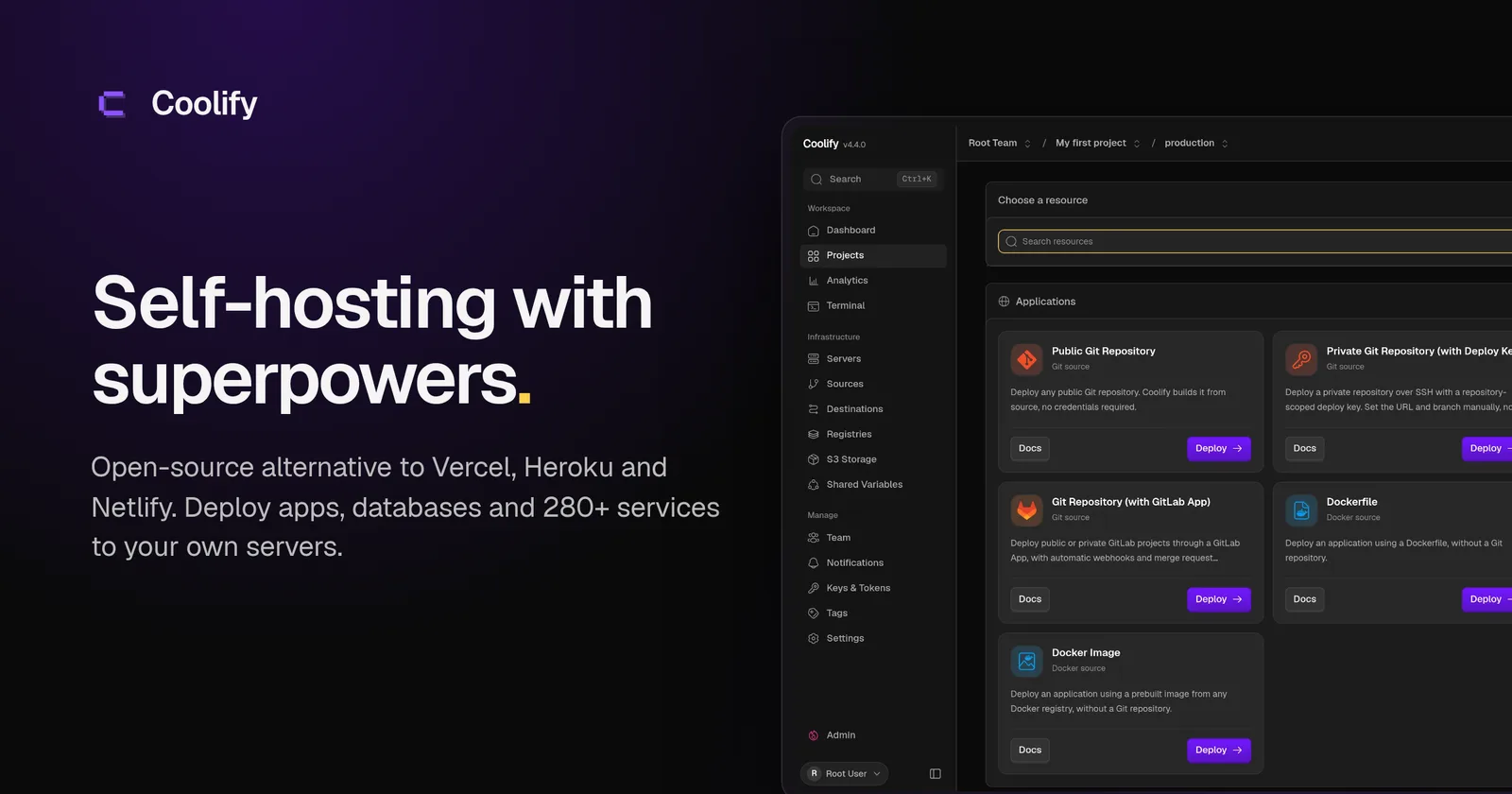 Coolify's "choose a resource" screen — deploy from a public or private Git repo, a Dockerfile, or a prebuilt image.
Coolify is the default answer in most self-hosting threads, and the numbers back that up: roughly 63,000 GitHub stars, Apache-2.0 licensed, actively developed since 2021. It manages servers directly over SSH — no Kubernetes or Docker Swarm required — and deploys a Traefik instance on each connected server to handle routing and Let's Encrypt certificates automatically.
Pros
- Genuinely free self-hosted: the pricing page states full access to every feature, including unlimited servers and teams, with no paywall. Coolify Cloud ($5/mo for 2 servers) buys you managed hosting and support, not extra features.
- The largest one-click catalog of the bunch — 280+ services (databases, analytics tools, CMSs) deployable with a couple of clicks.
- Built-in preview deployments for pull requests, which Dokploy doesn't offer out of the box.
- Large, active community (600+ open issues is also a sign people are actually using and reporting against it daily).
Cons
- Heavier than the others: official minimums are 2 CPU cores, 2 GB RAM, 10 GB disk. It'll technically boot on 512 MB, but the docs explicitly say not to.
- Multi-server means independent copies on each server, not clustering — Coolify won't load-balance traffic between them for you. You still need a load balancer in front if you want that.
- Direct-Docker-over-SSH is simple to reason about but means there's no built-in failover if a server goes down.
Choose Coolify if you want the single most feature-complete free option, you're deploying a mix of app types and one-click services, and you have at least a $12–20/month VPS to give it room to breathe. See Coolify's full listing and ratings on the directory →
Dokploy
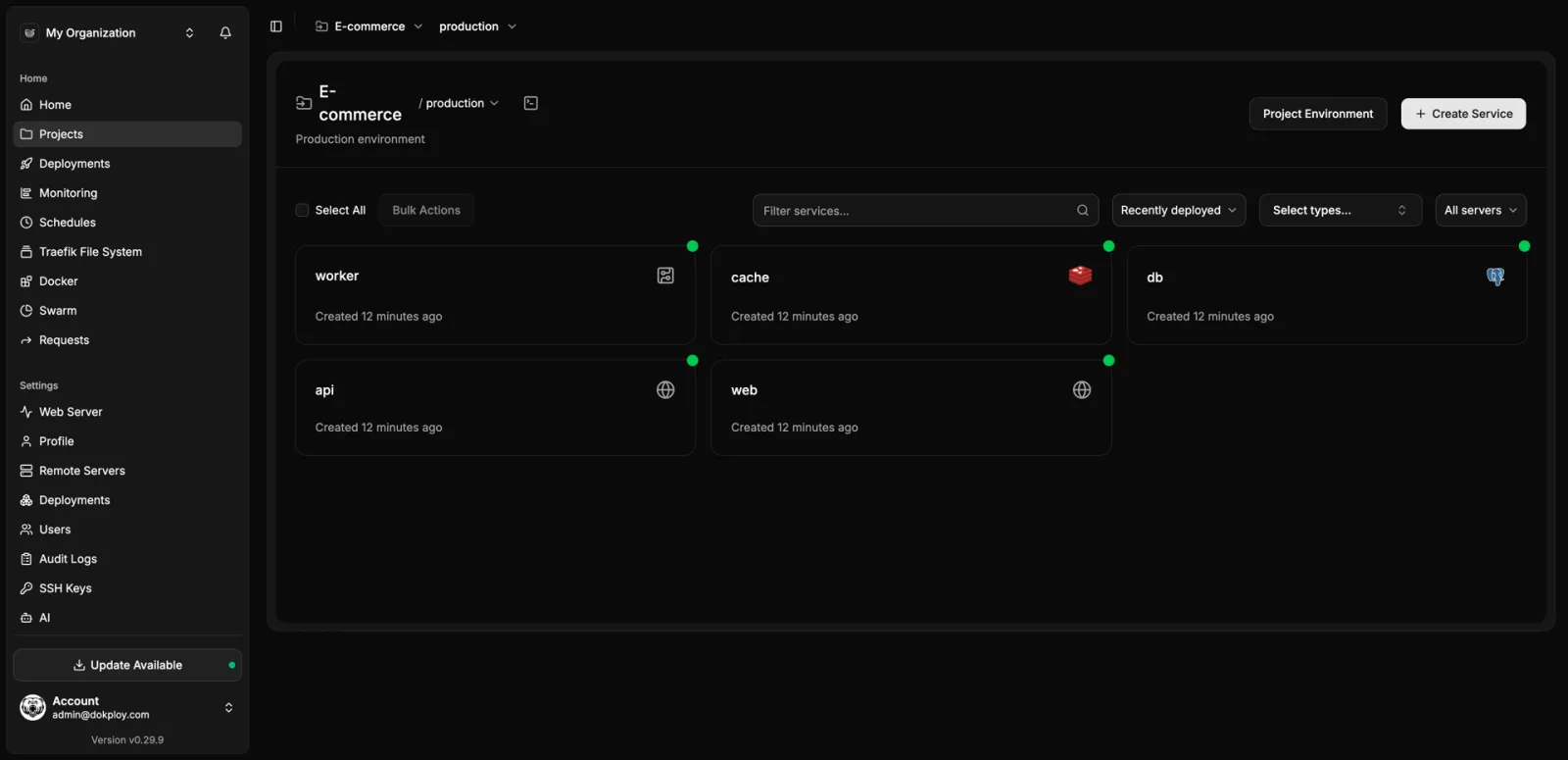 Dokploy's project view: every service in an environment, deployed and status-checked at a glance.
Dokploy is the newest of the established three (first commit in 2024) and has grown the fastest — about 38,000 stars in roughly two years. It initializes Docker Swarm on install, even on a single server, and uses Traefik for routing. That Swarm foundation is also what makes its multi-server story a real cluster rather than independent copies.
Pros
- Clean, modern dashboard (Next.js/shadcn) with a good first-run experience.
- Docker Swarm under the hood means native clustering: add a worker node and Traefik discovers services across the whole cluster automatically.
- Lighter on idle resources than Coolify in most comparisons, and the core is genuinely usable on a small VPS.
- Supports both auto-detected builds and raw
docker-compose.yml, so you're not boxed into one workflow.
Cons
- The core is Apache-2.0, but a
/proprietaryfolder under a separate "Dokploy Source Available" license covers Enterprise features — and multi-server management specifically requires a paid Enterprise license key to use in production. A single-server install is fully free; clustering is not. - Smaller one-click template catalog than Coolify (roughly 50 vs. 280+).
- No preview-environment feature built in yet.
- Younger project — two years old vs. Coolify's five — so it has had less time to hit the edge cases a bigger, older userbase surfaces. See Dokploy's full listing on the directory →
Choose Dokploy if you're running a single server (or a small number of independent servers, not a cluster), you like its dashboard, and you don't need SSO/audit logs/multi-server clustering — or you're fine paying for them when you do.
Arcane
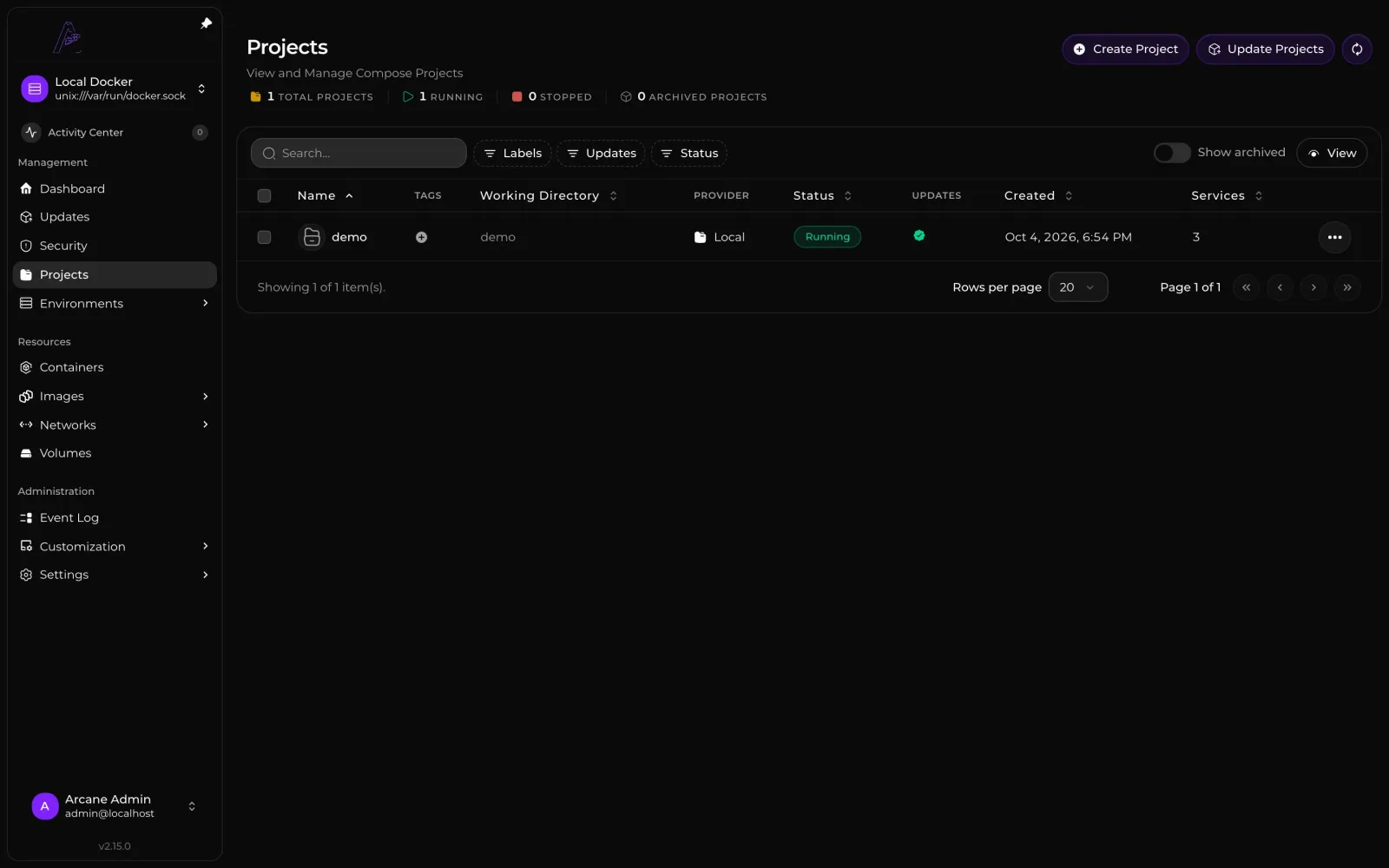 Arcane's Projects view — Compose stacks you already wrote, with their running status and service count.
Arcane (getarcane.app, getarcaneapp/arcane on GitHub) is the odd one out in this list, and
it's worth being upfront about that: it is not a git-push, auto-build PaaS like the other four. It's a modern,
fully-free Docker and Compose management UI — closer to Portainer than to Coolify. It's a single ~124 MB Go binary
with a SvelteKit frontend, BSD-3-Clause licensed, and about 18 months old with roughly 7,900 stars and very active
commits.
You still write (or Git-sync) your own docker-compose.yml; Arcane deploys it, gives you a clean UI over containers,
images, networks, and volumes, and can manage additional hosts through a lightweight remote agent. It does not
auto-provision a reverse proxy or HTTPS for you the way Coolify and Dokploy do — you point your own Nginx,
Apache, or Traefik at it.
Pros
- Completely free, forever, with zero gated features — no Business Edition split like Portainer, no Enterprise license key like Dokploy. SSO/OIDC, remote-host agents, and vulnerability scanning are all included.
- Lightweight and fast: one small Go container, modern SvelteKit UI, clean navigation across Containers, Images, Networks, Volumes, and Compose Projects.
- Git Sync gives you a reasonable middle ground — pull changes from a repo and redeploy, or have Arcane push its own edits back to Git — without needing a full CI pipeline.
- Built-in vulnerability scanning for images and a published SBOM, which none of the other four tools in this post offer natively.
Cons
- No framework auto-detection and no "just push and it builds itself" flow — you bring a Compose file with a
build:orimage:directive. This is a real category difference from Coolify, Dokploy, Dokku, and Openship, not just a rough edge. - No automatic reverse proxy or HTTPS — configuring Nginx/Apache/Traefik in front of it, including WebSocket and gRPC settings for the remote agent, is on you.
- No one-click app catalog or marketplace the way Coolify and Dokploy have.
- Needs a service with
build:configured and a manual click (or a Git-sync pull) to rebuild — there's no automatic build-on-push the way a real PaaS offers. - Young project (~18 months) — fast-growing and actively shipping, but with far less production mileage than Coolify or Dokku.
Choose Arcane if you already write your own Compose files and reverse-proxy config, and you want a clean, fully free, modern web UI to see and redeploy your stacks — including across multiple hosts — without ever hitting a paywall for SSO or scanning.
Dokku
Dokku doesn't get a screenshot, because there mostly isn't one to take — that's the point. It's the closest thing to running your own Heroku: a pure command-line tool (MIT licensed, the most permissive of the bunch, running since 2013 with ~32,000 stars) with no web dashboard by default. You add a Git remote and push:
git remote add dokku [email protected]:my-app
git push dokku main
Dokku detects your stack via Heroku-compatible buildpacks (or a Dockerfile if you prefer), builds it, and serves it behind Nginx with a generated vhost. That's the entire workflow.
Pros
- The smallest footprint by far: 1 GB RAM for the default Docker scheduler is the official minimum, and it's by far the lightest option if you're on a cheap or older box.
- MIT license, no paid tier, no proprietary folder — nothing is gated.
- Extremely low open-issue count (35) relative to nine years of history and 32,000 stars — this is a mature, slow-moving, "just works" project.
- No background dashboard process running and listening on your server — one less admin panel to secure.
Cons
- No GUI. If you want to glance at running apps, logs, or resource usage without SSHing in, you're adding a third-party plugin or living without it.
- Single-server only, no built-in clustering story.
- The buildpack-first workflow feels dated if your team has never worked with Heroku; Dockerfile support closes the gap but you lose some of the "just push" magic.
Choose Dokku if you live in the terminal, don't want a web panel running on your production box at all, and your setup is small enough that one server is genuinely enough.
Openship
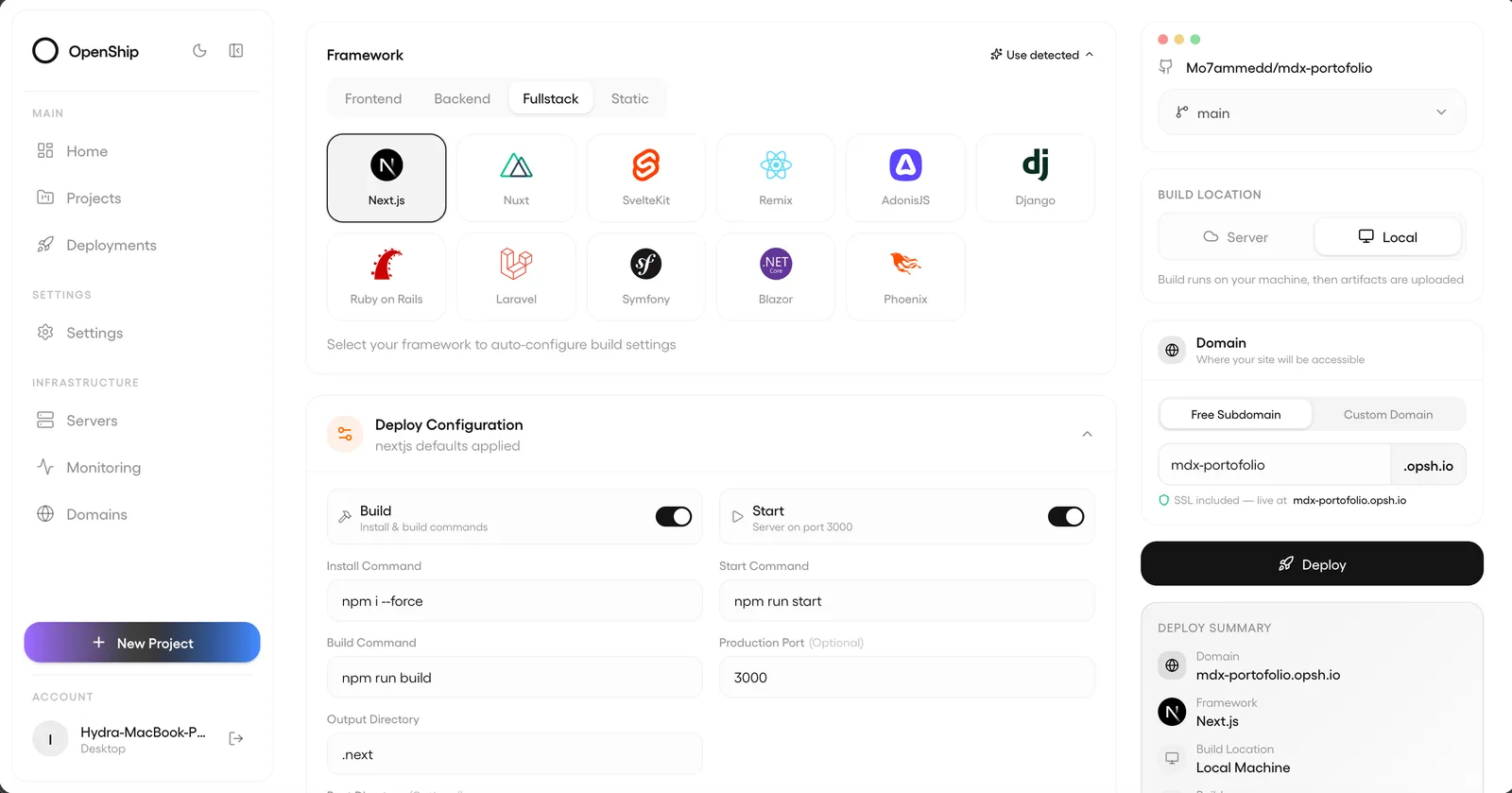 Openship's deploy flow: pick a framework (or let it auto-detect), confirm the build, deploy.
Openship — the tool the question named directly — is a genuinely different project from the older, unrelated
e-commerce order router that shares the name, so if you've seen "Openship" described as a dropshipping tool, that's
not this one. This Openship (openship.io, oblien/openship on GitHub) is a self-hostable deployment platform that
publicly launched in July 2026 and has already picked up close to 15,000 stars.
The architecturally interesting part: it doesn't require an agent running on the servers it deploys to. Code is streamed over SSH and built there, rather than every target server running a Dokploy- or Coolify-style daemon long-term.
Pros
- Fully Apache-2.0, and unlike Dokploy, nothing is held back for a paid tier — self-hosting is free with no gated features. Openship Cloud ($5/mo) is a convenience option, and one Cloud subscription covers unlimited self-hosted servers if you want a hybrid setup.
- No agent required on target servers — it connects over SSH and streams the build, which is a smaller footprint and a smaller attack surface per server.
- Broad stack auto-detection out of the box (Node, Python, Go, Rust, PHP, Ruby, Java, .NET, Docker, monorepos), zero-downtime deploys with instant rollback, and a genuinely unusual extra: a built-in mail server with SPF/DKIM/ DMARC, so "send transactional email" doesn't require bolting on a separate service.
- Control it from a web dashboard, CLI, desktop app, or an MCP endpoint for AI agents — useful if your deploy flow already involves an agent.
Cons
- It's beta software, seven months old at the time of writing. Coolify has five years of production mileage and Dokku has thirteen; Openship has months. Treat its own security claims as vendor-reported until it's had more outside scrutiny.
- Smaller template catalog (43) and a much smaller community than Coolify's.
- The no-agent, SSH-streaming architecture is new enough that it hasn't been stress-tested the way Docker-daemon-based tools have across thousands of different server configurations.
Choose Openship if you want the newest ideas in this space — broad language auto-detection, no long-running agent, built-in email — and you're comfortable running something that's still earning its track record.
Worth a mention, but not a full contender
- Portainer is Arcane's closest relative and the more established option: a general Docker/Kubernetes management UI, also not a git-push PaaS. Community Edition (Zlib license) is free; Business Edition (from ~$1,045/yr) adds RBAC, SSO, and Kubernetes fleet governance — the features Arcane gives away for free, in exchange for Portainer's much longer track record and Kubernetes support, which Arcane doesn't have.
- Easypanel shows up in almost every one of these comparisons, so it's worth being direct about it: it is not open source. There's no public source repository; it's a closed, licensed panel ($14.90–$37.90/month per server after a 3-project free tier). It's a fine product, but if "open source" is a requirement for you, it doesn't qualify.
- Kamal (from 37signals/Basecamp, MIT licensed) isn't a dashboard at all — it's a CLI that does zero-downtime Docker deploys over SSH, with no daemon running on your server between deploys. If you want the smallest possible attack surface and are fine driving deploys from CI instead of a web UI, it's the philosophical opposite of Coolify and worth knowing about.
At a glance
| Coolify | Dokploy | Arcane | Dokku | Openship | |
|---|---|---|---|---|---|
| License | Apache-2.0 | Apache-2.0 + proprietary module | BSD-3-Clause | MIT | Apache-2.0 |
| Self-hosted cost | Free, all features | Free (single server); Enterprise key needed for multi-server/SSO | Free, all features, forever | Free, nothing gated | Free, nothing gated |
| Needs an agent on target servers | Yes (SSH + Docker) | Yes (Swarm node) | Yes (Docker socket; optional remote agent for extra hosts) | Yes (Docker) | No — streams over SSH |
| Build method | Nixpacks-style auto-detect, Dockerfile, Compose | Auto-detect, Dockerfile, Compose | None — you bring a Compose file with build:/image: | Buildpacks or Dockerfile | Auto-detect (10+ stacks) |
| One-click apps | 280+ | ~50 | None (no app catalog) | Via buildpacks | 43 |
| Auto HTTPS / reverse proxy | Yes (Traefik) | Yes (Traefik) | No — bring your own Nginx/Apache/Traefik | No (manual Nginx vhost) | Yes |
| Multi-server | Yes, free (independent copies, no auto-LB) | Yes, clustered via Swarm — paid | Yes, free, via remote agent | No | Yes, free |
| Min specs | 2 CPU / 2 GB RAM | ~1–2 GB RAM | Not officially published; single lightweight binary | 1 GB RAM | Not yet widely benchmarked |
| Age / stars (Oct 2026) | 5 yrs / ~63k | 2 yrs / ~38k | 18 months / ~7.9k | 13 yrs / ~32k | 7 months / ~15k |
| Dashboard | Yes | Yes | Yes | No (CLI only) | Yes |
Picking one
For most people building more than one app, Coolify is still the sensible default: it's fully free, has the biggest catalog, and five years of other people finding the bugs first. Reach for Dokploy if you like its UI more and you're running a single server — just know that clustering is a paid feature, not a free one, so don't pick it expecting Coolify-style free multi-server. Arcane is a different kind of tool entirely: pick it if you already know Docker Compose and just want a clean, free, no-paywall dashboard over stacks you've written yourself — not if you want git-push automation, which it doesn't do. Dokku is for people who want zero web dashboard and are happy living in the terminal. And Openship is worth watching — the no-agent architecture and built-in email are genuinely new ideas — but weigh that against it having months, not years, of production mileage before you put something you depend on behind it.
Whichever you pick, don't expose the dashboard directly to the internet without basic auth or a VPN in front of it — that advice applies equally to all five.
Related posts
More on Self-Hosting, Docker.

A Docker Compose Starter Stack for Your First Self-Hosted Setup
The handful of pieces every self-hosted setup needs before the apps: a reverse proxy, automatic HTTPS, backups, and updates. A calm walkthrough you can finish in an afternoon.

Reverse Proxy Explained: Caddy vs. Nginx vs. Traefik for People Who Just Want HTTPS
What a reverse proxy does, why every self-hosted setup needs one, and how the same job looks in Caddy, Nginx, and Traefik, with the actual config for each.

PostgreSQL vs. SQLite for Self-Hosted Apps: Which Should You Actually Use?
SQLite is not a toy and Postgres is not always overkill. A practical look at when each one is the right call for a self-hosted app, with concrete scenarios.